Context Engineering
The context window is not a box you fill but a budget you administer — what goes in, what stays, and what gets evicted at every step of an agentic loop.

Until recently the question was "how do I phrase this better." Today the question is "what should the model even be seeing at the moment it makes this decision." That shift in the question has a name, and this article is about it.
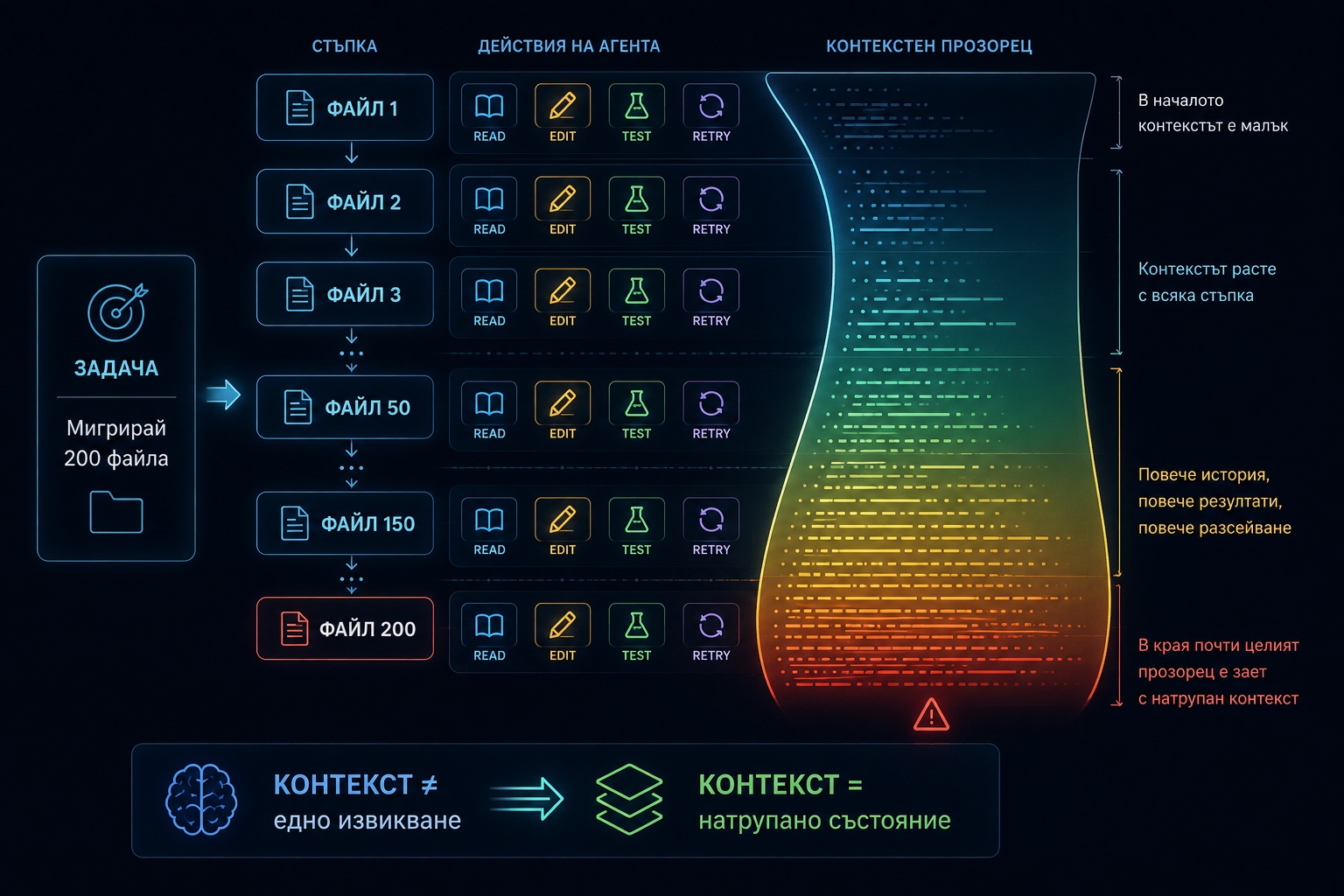
One example runs through the entire text. An agent is handed a migration: two hundred files need to move from one library to another. The work doesn't fit in one call, or in ten. The agent will read, write, run tests, backtrack — for hours on end.
Everything that follows is illustrated on this example.
What Context Engineering Is
Every model makes decisions based on what it sees at that moment.
The problem is that in agentic systems, that "what it sees" changes constantly.
That is exactly what context engineering is: the discipline of managing precisely what the model sees at every step of a multi-step task.
The context window is not a box you fill. It is a budget you administer. Everything that enters it competes for the model's attention with everything else — and gets paid for on every subsequent call, because the history is re-sent from scratch each time.
Perhaps the most precise formulation belongs to Andrej Karpathy: the art of filling the context window with exactly what is needed for the next step. Note the "for the next step." Not for the task — only for the step.
What counts as context — all of the following:
- the system prompt;
- the tool definitions (rendered before the system prompt);
- the entire conversation history;
- the result of every tool call;
- fetched documents, files, search results;
- memory files, if the agent has any;
- and finally — what the user typed.

The prompt is the last item on the list and usually the smallest. With two hundred files, the system prompt is maybe 2% of the window. The other 98% is accumulation.
Accumulation is the problem.
From here on, this article is about what to do about it. The diagram below shows the path from everything the agent has access to, down to what actually enters the window right now.
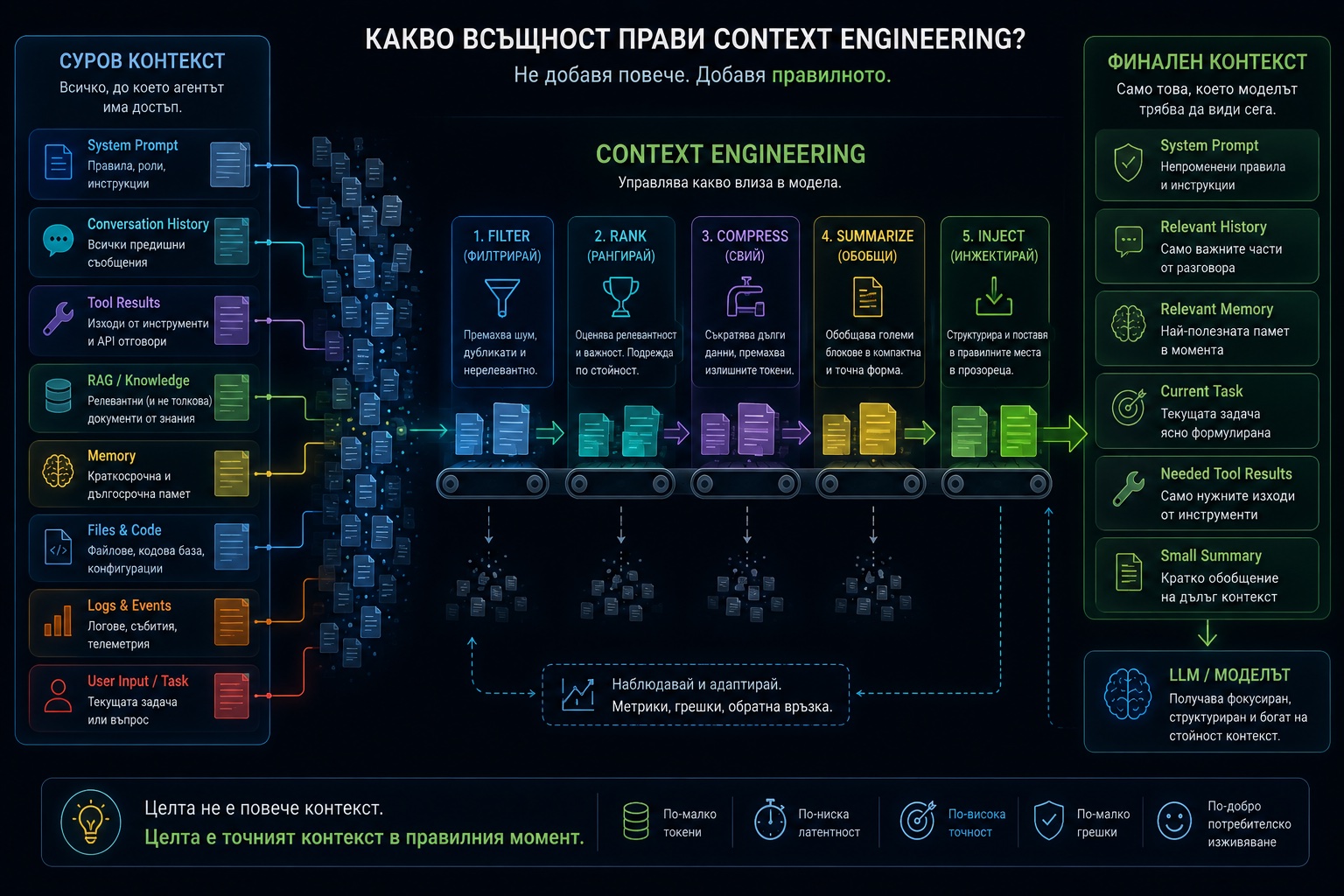
This happens at every step, anew. We'll get to the strategies that make it possible — but this is the mechanics.
How It Differs from Prompt Engineering
Prompt engineering hasn't been replaced. It has been reduced to one component of something larger — and the component you control most fully turns out to be the smallest one.
In prompt engineering the input is authored. In context engineering the input is accumulated.
| Prompt Engineering | Context Engineering | |
|---|---|---|
| Unit of work | one call | a loop of N steps |
| Who writes the input | a human | it accumulates on its own |
| What gets optimized | wording | what goes in and what goes out |
| Primary failure | the model misunderstood | the model sees the wrong thing |
| Tools of the trade | words | architecture |
| When it happens | before execution | during execution |
This runs deeper than it sounds. When you write a prompt, every word in it has passed
through you. When the agent is on file 60 of 200, ninety percent of its window is
content no human has ever read: grep output, file contents, test results, its own
reasoning from forty steps ago. You never saw it, and you never wrote it.
Only two things can be controlled: what is allowed in and when something must go out.
An analogy that holds up: prompt engineering is writing a good SQL query. Context engineering is designing the schema. The second doesn't replace the first — but if the schema is wrong, no query will save the situation.
Five Kinds of Context Failures
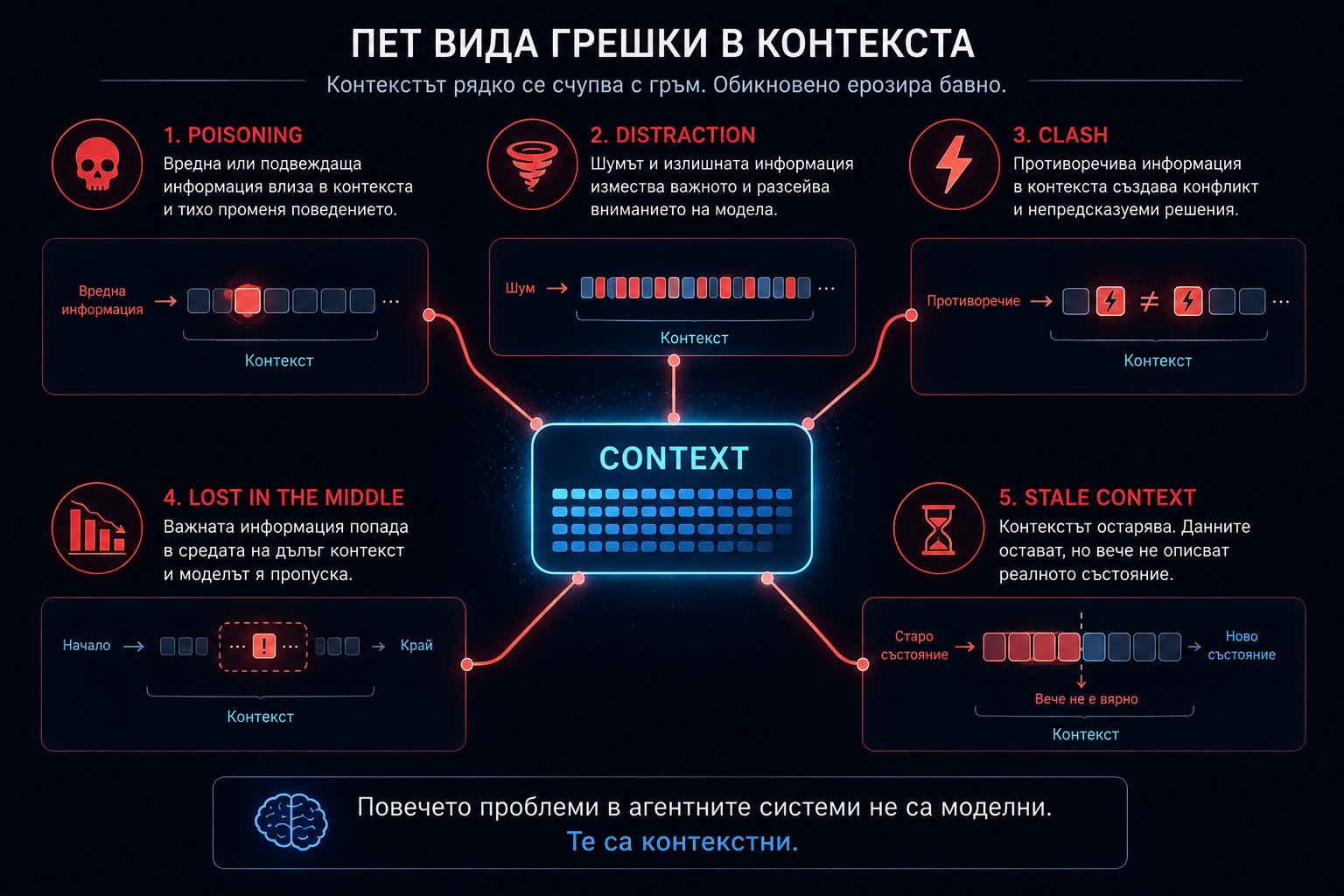
It's worth being specific here, because "the model gets confused with long context" is useless as a diagnosis. The failures are distinct and they are treated differently.
Before the failures: exhaustion, cost, and latency
The most obvious one. Two hundred files don't fit. Even with a million-token window, an agent that reads a file, edits it, runs tests, and reads the output burns several thousand tokens per file. By file 70 the window is full.
At least this is an honest failure — you notice it, you get an error, or compaction kicks in. The rest are more insidious, because the system keeps working and simply starts giving worse answers.
The history is re-sent in full on every call. A conversation that has reached 200K tokens pays 200K on every subsequent step. Without caching, a long agentic loop costs quadratically in its own length.
Those are the physical limits of the window. The next five problems are more insidious: the system keeps running, but starts running worse.
Distraction
The more history accumulates, the more the model leans on it instead of reasoning fresh. It shows up as repetition: the agent migrates a file it already migrated, because thirty steps back the context still contains a message saying that file is up next.
The telltale symptom: the agent starts recounting what it has done instead of doing the next thing.
Poisoning
The most expensive one. On file 12 the agent got the new API's signature wrong — it invented a parameter that doesn't exist. That mistake now sits in the context as a fact. On files 13 through 90 it reuses it, consistently and confidently, because to the model it is exactly as credible as everything else in the window.
The context has no notion of "that was a guess." Everything inside carries equal weight. One hallucination that enters early reproduces itself until the end of the session.
Clash
The agent read a file at step 20. At step 45 it edited that same file. Both versions are in the context. Which one is the truth?
Or: at step 5 it made a plan. At step 60 the plan was revised. The old plan didn't disappear — it still sits up there, pulling behavior toward itself.
Confusion
Give a model fifty tools and it starts picking the wrong one. Not because it doesn't understand what each does, but because the descriptions compete. The same goes for fetched documents: five relevant ones beat fifty of which five are relevant.
Lost in the middle
Information in the middle of a long window gets used less than the same information at the beginning or the end. Which means position is a design decision, not an accident. If a critical constraint sits at the 40% mark of the window, it sits in the worst possible place.

The Patterns
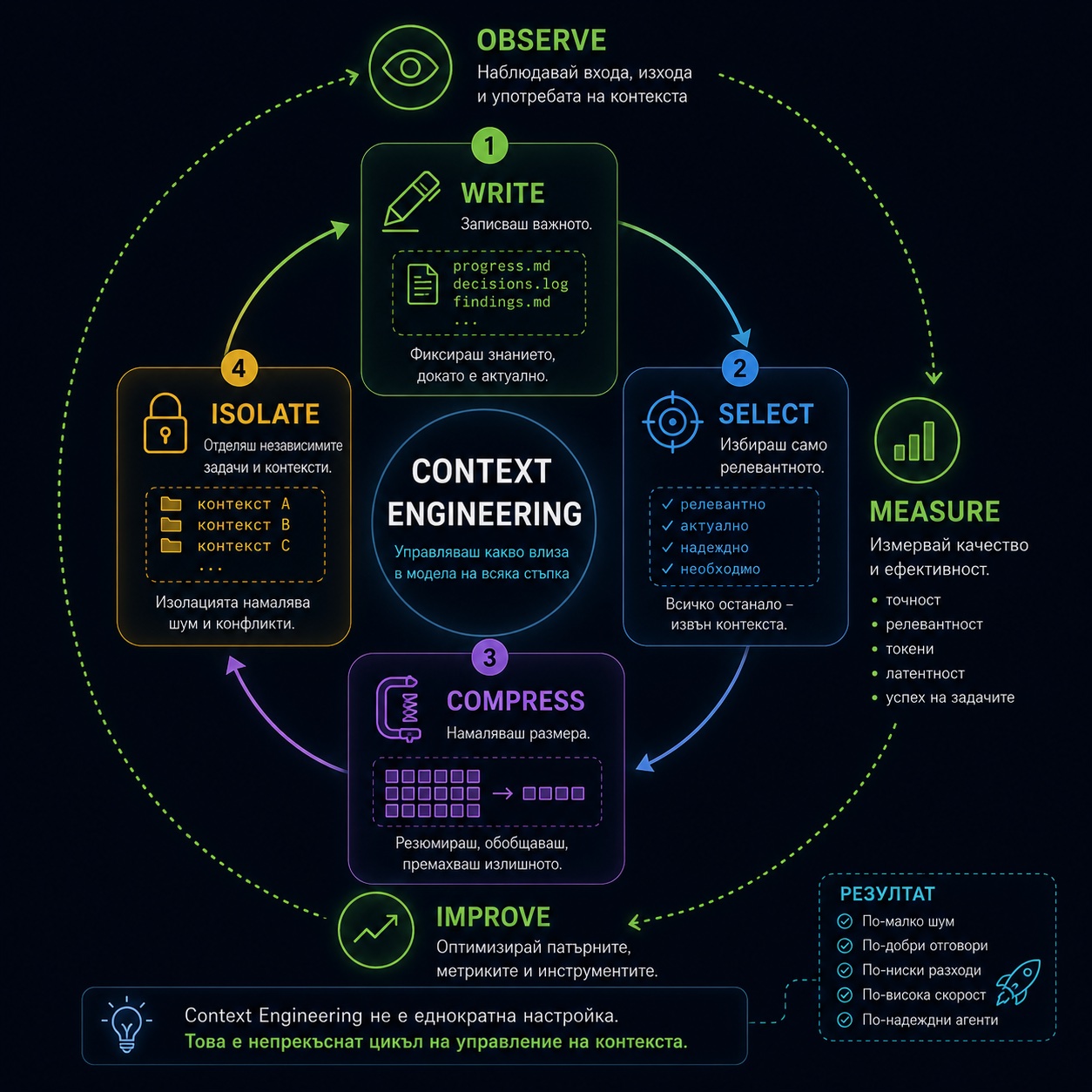
The industry has settled on four verbs. They're useful because they're exhaustive: every technique is one of them.
Write. Select. Compress. Isolate.
1. Write — get the state out of the window
The most underrated pattern, and the cheapest.
If something needs to outlive the context, it must not live in the context. It should be written to disk.
The progress file. For the migration: one markdown file the agent maintains itself.
# Migration: legacy-http → fetch-client

## Done (67/200)
- src/api/users.ts — ok, tests pass
- src/api/orders.ts — ok
- src/api/billing.ts — PARTIAL: retry logic has no equivalent, see note

## Rules learned along the way
- `.timeout(ms)` becomes `signal: AbortSignal.timeout(ms)` — NOT `timeout:`
- on POST the old client serializes on its own; the new one wants explicit JSON.stringify
- files under src/legacy/ are skipped — they're marked deprecated

## Next
- src/api/reports.ts
This file costs two hundred tokens and fixes four of the failures listed above. Distraction disappears, because "what's done" is read from a file rather than reconstructed from history. Poisoning becomes repairable, because the rules live in one place and can be edited. Clash disappears, because there is a single source of truth for progress.
Crucially: the file is not a log. It is current state. The agent overwrites it, it doesn't append. A log grows; state doesn't.
Don't rely on the model to remember. Make it write things down.
Memory across sessions. The progress file dies with the task. What needs to outlive even the task is a different pattern: separate files, one fact per file, a short description at the top, and an index loaded at the start of every session.
---
name: fetch-client-timeout-migration
description: How to migrate timeout when moving from legacy-http to fetch-client
---

`.timeout(ms)` has no direct equivalent. Use
`signal: AbortSignal.timeout(ms)`. The `timeout:` field in options is silently
ignored — which is why the tests pass while requests hang in production.
Three things make this pattern work:
- One fact per file. A file with twenty facts gets loaded whole even when only one of them is needed.
- The description is the search key. It's what gets read to decide whether the file should be opened at all. It's written for retrieval, not for a human.
- Markdown, not a vector database. It can be read, edited, committed to git, seen in a diff — and when something is wrong, deleted. A vector database is opaque exactly when you most need to see what the agent "remembers."
If this sounds like AGENTS.md or CLAUDE.md — yes, same family. The difference is that CLAUDE.md is static and written by a human, while memory is written by the agent as it works.
In the Anthropic API this also comes ready-made: the memory tool (
memory_20250818) exposes read and write commands over a memory directory to the model. The backend is yours — which is exactly why it's a plain directory and not a service.
2. Select — control what goes in
Don't preload what can be fetched just in time. The classic mistake is stuffing all
two hundred files in at the start "for context." The right approach is for the agent to
have glob and read, and to read each file when it gets to it.
That's also the difference between 2023-era RAG and today's approach: back then retrieval happened before the reasoning; now the agent retrieves during the reasoning, because it knows what it needs.
Progressive disclosure. Skills work exactly this way: the skill's description sits in the context permanently and costs one line, while the body is loaded only when the task calls for it. The content on disk can be a hundred pages — the cost in the window is a sentence.
Tool search. If the agent has fifty tools, fifty schemas sit in the window from the
first second. The alternative is to mark tools with defer_loading: true and let the
model search for them when needed (tool_search_tool_regex_20251119, or the BM25
variant). Schemas are appended, not swapped — which preserves the cache.
tools = [
    # The search tool itself must NOT be deferred — otherwise the model
    # has nothing to search with.
    {"type": "tool_search_tool_regex_20251119", "name": "tool_search_tool_regex"},

    # Everything else enters the window only when needed.
    {"name": "get_leave_balance", "description": "...",
     "input_schema": {...}, "defer_loading": True},
    {"name": "team_coverage", "description": "...",
     "input_schema": {...}, "defer_loading": True},
    # … forty-eight more
]
Defer everything, including the search tool, and the API returns a 400. At least one tool must be loaded — otherwise the model is blind to its own toolbox.
Filter before it enters. If a tool returns 40K tokens of JSON and the model needs three fields, the filtering is your job, not its. With programmatic tool calling the result goes into executing code rather than into the context — only the final output enters the window.
3. Compress — control what stays
There are two different things here that constantly get conflated.
Compaction summarizes. When the context approaches the threshold, the history is
summarized and the summary replaces the original. In the API it's a server-side feature
(beta compact-2026-01-12, default threshold around 150K tokens).
One trap is worth knowing in advance: on the next request you send back the entire
response.content, not just the text. The compaction blocks are part of the content,
and the API uses them to substitute the compacted history. Extract only the text, and
the state is lost silently.
response = client.beta.messages.create(
    model="claude-opus-5",
    max_tokens=16000,
    betas=["compact-2026-01-12"],
    context_management={"edits": [{"type": "compact_20260112"}]},
    messages=messages,
)

# This is exactly where it breaks. The whole content, not just the text:
messages.append({"role": "assistant", "content": response.content})

# NOT this — the compacted state vanishes silently, with no error:
# messages.append({"role": "assistant", "content": response.content[0].text})
The bug won't announce itself. The conversation just starts losing history, and it looks like the model is forgetting.
Context editing clears. It doesn't summarize — it removes. There are two
strategies: clear_tool_uses_20250919 for old tool results and
clear_thinking_20251015 for thinking blocks (beta context-management-2025-06-27).
client.beta.messages.create(
    model="claude-opus-5",
    max_tokens=16000,
    betas=["context-management-2025-06-27"],
    context_management={
        "edits": [
            # Also removes the arguments the tool was called with, not just the result.
            {"type": "clear_tool_uses_20250919", "clear_tool_inputs": True},
            {"type": "clear_thinking_20251015"},
        ]
    },
    tools=tools,
    messages=messages,
)
Which one when: clearing is for things with no residual value — the grep output from
forty steps ago, the contents of a file that has already been migrated. Summarizing is
for things whose essence must survive — what was decided, and why.
The practical rule: clear tool results aggressively, summarize reasoning sparingly. Results can be regenerated with a single call. Decisions can't.
Task budget. If there's a loop that could run away, the model can be given a
ceiling it is made aware of (beta task-budgets-2026-03-13, minimum 20,000 tokens).
The difference from max_tokens is that the model sees the countdown and
prioritizes — it wraps up cleanly instead of being cut off mid-thought.
4. Isolate — not one window, but several
If the task decomposes into independent parts, each can get its own window.
For the migration: one subagent per file. Each gets the file, the rules from the progress file, and nothing else. It returns "done" plus, occasionally, a new rule. The parent never sees the contents of the files — it sees sixty-seven lines of results.
This is the only pattern that genuinely multiplies capacity rather than conserving it. The other three stretch it.
The cost: coordination, latency, and cache loss if the subagent runs on a different model. It's worth it when the parts are truly independent. It's not worth it for a task the parent could finish itself in three calls — there the subagent pays more to establish context than it saves.
A special case of isolation: quarantine for untrusted content. If the agent reads web pages or third-party documents, that content can carry instructions. Passing it first through a subagent that extracts only the data is both a defense and context engineering.
Caching Is Part of the Discipline
This gets overlooked, yet it follows directly from the order in which the context is assembled.
Caching is a prefix match. A single changed byte at position N invalidates
everything after N. The rendering order is tools → system → messages.
The entire discipline follows from that:
- Stable up front, volatile at the back. A date in the system prompt invalidates the whole window on every request.
- Don't touch the tools mid-flight. They sit at position zero — adding one tool invalidates everything.
- Serialize deterministically.
JSON.stringifywithout sorted keys is a silent killer. - Verify, don't assume.
usage.cache_read_input_tokens. If it's zero on repeated requests with an identical prefix, there's an invisible invalidator somewhere.
In practice the whole discipline comes down to where one boundary sits:
client.messages.create(
    model="claude-opus-5",
    max_tokens=16000,
    system=[
        {"type": "text",
         "text": STABLE_INSTRUCTIONS,                 # never changes
         "cache_control": {"type": "ephemeral"}},     # ← the cache boundary
    ],
    messages=[
        *history,
        # Today's date lives HERE, after the boundary — not in the system prompt.
        {"role": "user", "content": f"Today is {today}. {question}"},
    ],
)
The same date string, moved thirty lines up into system, invalidates the whole window
on every request. The difference between a working and a broken cache is often exactly
that — one line, on the wrong side of the boundary.
The economics: a cache read costs about 0.1× the normal price, a write 1.25× (for the five-minute TTL) or 2× (for the one-hour one). Over a long agentic loop, that is the difference between tolerable and absurd.
The minimum cacheable prefix depends on the model and is not monotonic across generations — 512 tokens on the newest models, but 4096 on some older ones. A prompt that never cached can start caching from a model switch alone.
What This Looks Like Across the Industry
The interesting part is that nearly every modern agent framework has gradually started solving exactly these problems — each in its own way.
The term took hold in 2025 — first in conversations about how "prompt engineering" no longer described the work actually being done around agents. Since then, a few things show up everywhere and are worth knowing by name.
The four verbs (write / select / compress / isolate) are the most widespread taxonomy, and I used them above.
The failure taxonomy — poisoning, distraction, confusion, clash — is the other widely cited framework, useful because it turns "the model got confused" into a diagnosis with a treatment.
AGENTS.md / CLAUDE.md became a convention: a file at the project root that tells the agent how to work on this codebase. That's context engineering done by a human and versioned in git.
MCP is the plumbing. It doesn't decide what enters the window — but it standardizes where things can come from, and makes tool search and progressive disclosure applicable uniformly across all sources.
The specifics below are from the Anthropic API — the code examples in this article use it. Other providers have equivalents for some of the mechanisms, but the names and behavior differ. Here is what's available and worth knowing by name:
| Mechanism | What it does |
|---|---|
| Prompt caching | the prefix isn't recomputed |
| Compaction | summarizes the history as it approaches the threshold |
| Context editing | clears old tool results and thinking blocks |
| Memory tool | a memory directory that outlives the session |
| Tool search | tool schemas load on demand |
| Skills | instructions with progressive disclosure |
| Task budgets | the model sees a ceiling and prioritizes |
| Programmatic tool calling | intermediate results never enter the context |
This table will age faster than the rest of the article. The exact beta header names and thresholds shift — verify them before writing them into code.
What to Do Tomorrow
If you have an agent in production and want somewhere to start, this is the order.
Measure first, optimize second. See how far the window gets in a real loop and how much of it is cached. Most people optimize the wrong thing because they guessed where the problem was.
u = response.usage
print("uncached:        ", u.input_tokens)
print("written to cache:", u.cache_creation_input_tokens)
print("read from cache: ", u.cache_read_input_tokens)
The full prompt is the sum of all three. input_tokens is only the remainder — if
the agent has been running for hours and the number shows 4K, the rest came from the
cache. This is where the most common misdiagnosis hides: staring at a single number
that, by design, does not show the size of the context.
Give it somewhere to write. A progress file is half a day of work and fixes more than anything else in this article. Start there.
Clear tool results aggressively. They are the bulkiest and fastest-depreciating content in the window.
Don't compress prematurely. Compaction on a conversation that was going to end anyway is pure loss — you pay for a summary of something that wasn't in the way.
Keep the tools under control. If there are more than twenty, look at tool search before adding the twenty-first.
Write down what you'd otherwise re-derive. A rule learned on file 12 and written down costs two hundred tokens. The same rule rediscovered on file 90 costs a whole cycle — if it gets rediscovered at all, rather than missed.
Closing Words
Prompt engineering asked: what do I say to the model.
Context engineering asks: what does the model see, who decided that, and what has to leave before the next thing comes in.
The change isn't in the techniques. It's in the fact that the input is no longer authored text but accumulated state — and state is managed, not worded.
That's why the work used to feel like writing and now feels like architecture. The questions are the same ones you ask about any stateful system: what comes in, what lives how long, what gets evicted, and who decides.
The prompt is what you say. The context is what the model knows. The second job is the bigger one.